SDK usage issues
1. Hardware configuration
📖 【Question content】
- The map cannot be loaded normally and a white screen appears.
- Various layers cannot be displayed
💡【Suggested Plan】
- Check [Hardware Configuration and Browser](/mapmost_docs/webgl_en/latest/docs/intro#Hardware Configuration).
❗️【Notes】
- Please use Chrome browser and enable WebGL feature.
2. Authorization verification
📖 【Question content】
- The pop-up box displays "Please enter the authorization code!"
- The console reports an error "Authorization verification failed, please check the network or contact the Mapmost team!"
- The console reports an error "The authorization scope of the authorization code you used does not match the current product. Please contact the Mapmost team of Yuance Information Technology!"
💡【Suggested Plan】
If you have not obtained the authorization code, please click the link below, fill out the product trial application, and obtain the SDK authorization code. https://www.mapmost.com/en/productApply/webgl(After the application is approved, you will be notified by SMS).
If you have obtained the authorization code, please check whether the
userIdparameter was added when initializing the mapnew mapmost.Map.If the
userIdparameter has been added, please check whether the entered authorization code is correct.If correct, the authorization code has expired and needs to be reapplied.
❗️【Notes】
- Each person has an independent authorization code and cannot use other people’s authorization codes.
- Authorization codes for different products cannot be mixed.
3. Using SDK in Vue
📖 【Question content 1】
The Vue project installs dependent packages through npm, and after the import is introduced, an error is reported when running. The error content is as follows:


💡【Suggested Plan】
- Enter the following command to install:
npm install url '@loaders.gl/core' '@loaders.gl/schema' '@loaders.gl/zip' '@loaders.gl/crypto' '@loaders.gl/compression'
- Add the following configuration in the config file:
configureWebpack:{
    resolve:{
      fallback:{
        'url':require.resolve("url/")
      }
    }
  },
📖【Question content 2】
- In the Vue project, the color of the map base map is abnormal. For example, if you add a Marker, the base map will appear abnormally red, load the tilt model and define the callback function, the base map roads will turn purple...
💡【Suggested Plan】
- Do not mount map layers or elements into vue instances.
❗️【Notes】
- If you have to mount it to the vue instance, in order to avoid abnormal situations, you need to mount the map object to the vue instance, but this is not recommended! ! !
4. Symbol layer
📖 【Question content】
When the content contains Chinese characters and numbers, the numbers appear vertically offset.

💡【Suggested Plan】
- Change the font
text-fontto "Noto Sans Regular" or "Noto Sans Bold".
map.addLayer({
    "id": "symbol",
    "type": 'symbol',
    "source": "sourceName",
    "layout": {
        "text-field": "Monitoring No. 25",
        "text-offset": [2.5, 0],
        "icon-image": 'camera',
        "icon-size": 0.5,
        "text-font": ["Noto Sans Regular"], // Set font
    },
    "paint": {
        'text-color': "#000000"
    }
})
The effect is as follows:

5. Model layer
📖 【Question content】
Load the model in black

The color configuration of addFlowLine method
coloris invalid
💡【Suggested Plan】
- If you are using a version below SDKv3.2.0, please set the
defaultLights,skyandexposureparameters when adding a model layer.
let options = {
    id: 'model_id',
    type: 'model',
    models: models_obj,
    defaultLights:true, // Turn on default lights
    sky: 'https://delivery.mapmost.com/cdn/WebGLData/hdr/yun_1.hdr', // Set environment map
    exposure:1.5, //Set exposure
    center: [120.67727020663829, 31.31997024841401],
};
map.addLayer(options);
- If you are using SDKv3.2.0 and above, please set the
defaultLights,envMapandexposureparameters inenv3Dwhen initializing the map.
let map = new mapmost.Map({
    container: 'map',
    style: "<your style url>",
    center: [120.67400351817594, 31.321374251251726],
    userId: '***', // Authorization code
    env3D: {
        defaultLights:true, // Turn on default lights
        exposure: 1.5, // Set exposure
        envMap: 'https://delivery.mapmost.com/cdn/WebGLData/hdr/yun_1.hdr' // Set environment map
    }
});
The effect is as follows:

❗️【Notes】
- To load a model with geometry compression, you need to set the parameter
dracoUrl:"https://delivery.mapmost.com/cdn/sdk/lib/draco/";- If you want to use it for offline or intranet deployment, you need to manually configure the corresponding loading resource library, download the following resources to store the newly created draco folder locally and publish this folder. When using it, you need to pass in the absolute path of the draco folder:
- To load models with KTX 2.0 textures, please use SDKv3.5.0 and above and set the parameter
ktx2ParseUrl:"https://delivery.mapmost.com/cdn/sdk/lib/basis/";- If you want to use it for offline or intranet deployment, you need to manually configure the corresponding loading resource library, download the following resources to store the newly created local basis folder and publish this folder. When using it, you need to pass in the absolute path of the basis folder:
6. 3DTiles layer
📖 【Question content 1】
- The SDKv3.1.3 version cannot be displayed correctly using the dynamic singleton effect.
💡【Suggested Plan】
- Adjust the layer loading order, add the
3DTileslayer first and then add themodellayer.
📖【Question content 2】
- When memory management is enabled in SDKv9.6.0+, blanks and flickers appear or have no effect.
💡【Suggested Plan】
- Adjust the maximum cache memory
maxMemoryUsageparameter value. This value should not be set too small or too large. If it is set too small, blanking and flickering will occur; if it is set too large, memory management will fail.
📖【Question content three】
Whether the SDK supports loading the 3DTiles service with ktx2.0 texture published by GISBox.
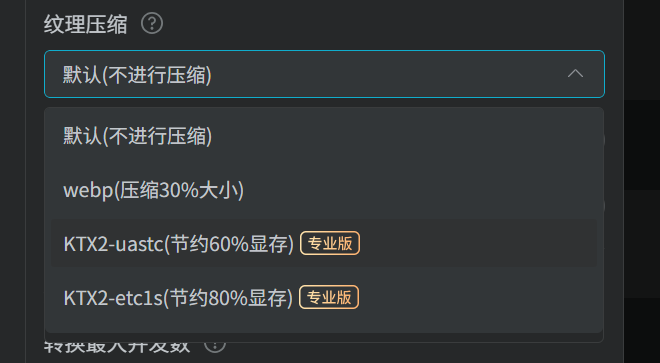
💡【Suggested Plan】
- The SDK supports the 3DTiles service with ktx2.0 textures released by GISBox, including the two compression formats in the picture above.
7. Extension plug-ins
📖 【Question content】
- The effect of using the plug-in is incorrect.
💡【Suggested Plan】
Check whether the SDK version number corresponds to the plug-in version number. The corresponding relationship between each plug-in is as follows:
2D graphics drawing plug-in:
draw version SDK version v 1.0.0 v 2.7.0+ v 1.1.0 v 3.3.0+ 3D model operation plug-in:
transformControls version SDK version v 1.0.0 v 2.10.0+ v 2.0.0 v 3.2.0+ 3D measurement plug-in:
measure3D version SDK version v 1.0.0 v 3.2.0+ v 1.1.0 v 3.5.0+ Map rolling shutter plug-in:
compare version SDK version v 1.0.0 v 3.3.0+
8. Load arcgis static slicing service
📖 【Question content】
- The slicing service is not a complete scale, and the zoom level is lost afterward.
💡【Suggested Plan】
- Add
minZoomandmaxZoomsettings in thesourceparameter.