3D building texture effect
You can set the texture effects for the side and top surfaces of three-dimensional buildings.
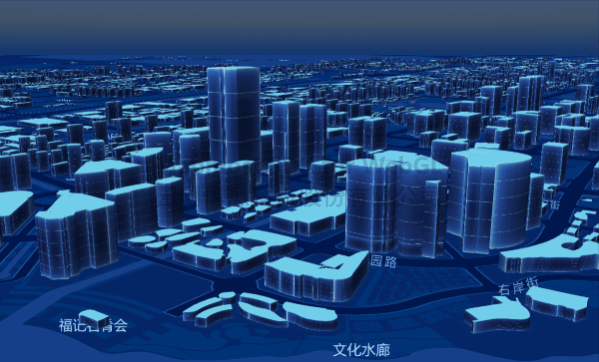
<!DOCTYPE html>
<html>
<head>
    <title>Three-dimensional architectural texture effect</title>
    <meta charset='utf-8'>
    <meta name="viewport" content="width=device-width, initial-scale=1.0, user-scalable=no">
    <script src="https://delivery.mapmost.com/cdn/sdk/webgl/v9.16.0/mapmost-webgl-min.js"></script>
    <style>
        body {
            margin: 0;
            padding: 0;
        }

        #map {
            position: absolute;
            top: 0;
            bottom: 0;
            width: 100%;
            /* height: 100%; */
        }
    </style>
</head>
<body>
    <div id="map">
    </div>
    <script>
        let map = new mapmost.Map({
             "center": [ 120.69011901264776,31.317389422051022],
            "zoom": 14.768414365772978,
            "bearing": -41.900227899715446,
            "pitch": 64,
            container: 'map',
            style: "<your style url>",
            sky: 'dark',
            userId: '***', // Authorization code
        });

        map.on('load', () => {
            //Add image resources
            map.loadImage('./static/wall.png', function (error, img) {
                map.addImage('wall', img);

                map.loadImage('./static/roof.png', function (error, img) {
                    map.addImage('roof', img);

                    //Add 3D building layer
                    map.addLayer({
                        "id": "buliding",
                        "type": "fill-extrusion",
                        "source": "cultural",
                        "source-layer": "b_buildings",
                        "minzoom": 0,
                        "maxzoom": 22,
                        "paint": {
                            "fill-extrusion-height": ["get", "jzzgdgd"],
                            "fill-extrusion-opacity": 1.0,
                            "fill-extrusion-pattern-side": "wall", // Set the side texture map
                            "fill-extrusion-pattern-top": "roof", // Set the top texture map
                            "fill-extrusion-pattern-side-spread-h": true, // Set whether the side texture of the extrusion body is stretched in the horizontal direction
                            "fill-extrusion-pattern-side-spread-v": true, // Set whether the side texture of the extrusion body is stretched in the vertical direction
                        }
                    })
                })
            })
        })
    </script>
</body>
</html>