Edit 3D labels
The added three-dimensional label can be translated.
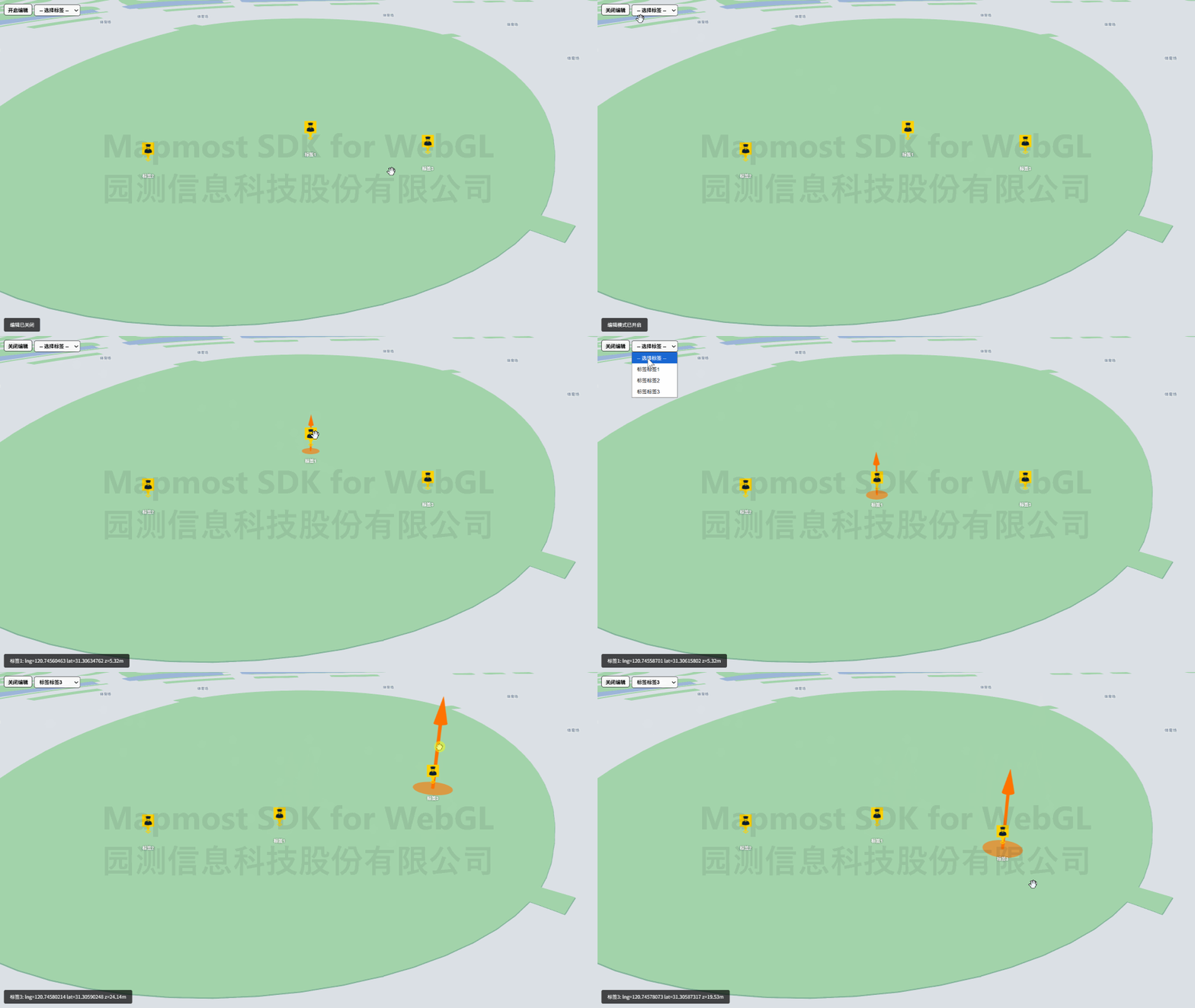
<!DOCTYPE html>
<html>
<head>
    <meta charset="utf-8"/>
    <title>Edit 3D labels</title>
    <meta name="viewport" content="initial-scale=1,maximum-scale=1,user-scalable=no"/>
    <style>
        body {
            margin: 0;
            padding: 0;
            overflow: hidden;
        }

        #map {
            position: absolute;
            top: 0;
            bottom: 0;
            width: 100%;
        }

        .btn-group {
            position: absolute;
            top: 20px;
            left: 20px;
            color: white;
        }

        .pointTag {
            display: flex;
            flex-direction: column;
            align-items: center;
        }

        .pointTag .icon {
            width: 34px;
            height: 54px;
            background-repeat: no-repeat;
            background-size: 100% 100%;
            background-image: url("./images/pin_security.png");
            transform: translateY(-50%);
        }

        .pointTag .text {
            color: #fff;
            font-size: 12px;
            font-weight: bold;
            text-shadow: 0 0 4px rgba(0, 0, 0, 0.8);
            white-space: nowrap;
        }

        .info {
            position: absolute;
            bottom: 20px;
            left: 20px;
            color: white;
            background: rgba(0, 0, 0, 0.7);
            padding: 8px 16px;
            border-radius: 4px;
            font-size: 13px;
            line-height: 1.6;
        }
    </style>
    <script src="https://delivery.mapmost.com/cdn/sdk/webgl/v9.16.0/mapmost-webgl-min.js"></script>
</head>

<body>
<div id="map"></div>
<div class="btn-group">
    <button id="btnToggleEdit">Close editing</button>
    <select id="selMarker">
      <option value="">-- Select tag --</option>
    </select>
</div>
<div class="info" id="posInfo"></div>
<script>
    let map = new mapmost.Map({
        container: 'map',
        style: "<your style url>",
        center: [120.74603465203592, 31.30605899929158],
        zoom: 19,
        pitch: 59.48725112156901,
        bearing: 0,
        userId: '***', // Authorization code
    });

    let modelLayer;
    let markers;
     map.on('load', function () {

        let options = {
            id: 'model_id',
            type: 'model',
            funcRender: function (gl, matrix) {
                if (modelLayer) {
                    modelLayer.renderMarker(gl, matrix)
                }
            },
            callback: function (group, layer) {
                modelLayer = layer;
                addMarker()
            }
        };
        map.addLayer(options);
    })

    function addMarker() {
        if (modelLayer) {
            let data = [
                {
                    name: "Tag 1",
                    element: createLabelWidget("Label 1"),
                    position: [120.74603465203592, 31.30605899929158, 20.0],
                },
                {
                    name: "Tag 2",
                    element: createLabelWidget("Label 2"),
                    position: [120.74609465203592, 31.30605899929158, 20.0],
                },
                {
                    name: "Tag 3",
                    element: createLabelWidget("Label 3"),
                    position: [120.74615465203592, 31.30605899929158, 20.0],
                },
            ];

            markers = myLayer.addMarker({
                id: 'markers',
                edit: true, //Enable editing mode
                data: data,
            });

            // Populate the drop-down box
            const selMarker = document.getElementById('selMarker');
            data.forEach((d, i) => {
                const opt = document.createElement('option');
                opt.value = d.name;
                opt.textContent = 'label' + d.name;
                selMarker.appendChild(opt);
            });
            selMarker.addEventListener('change', function () {
                const name = this.value;
                if (name) {
                    markers.selectMarkerByName(name);
                }
            });

            // Listen to drag events and dynamically display the coordinates of the currently dragged label
            const posInfoEl = document.getElementById('posInfo');
            window.addEventListener('marker-drag', function (e) {
                const d = e.detail;
                posInfoEl.innerHTML = d.name + ': lng=' + d.lng.toFixed(8) + ' lat=' + d.lat.toFixed(8) + ' z=' + d.z.toFixed(2) + 'm';
            });

            //Edit switch button
            const btnToggleEdit = document.getElementById('btnToggleEdit');
            btnToggleEdit.addEventListener('click', function () {
                if (markers.edit) {
                    markers.setEditable(false);
                    btnToggleEdit.textContent = 'Turn on editing';
                    posInfoEl.innerHTML = 'Editing is closed';
                } else {
                    markers.setEditable(true);
                    btnToggleEdit.textContent = 'Close editing';
                    posInfoEl.innerHTML = 'Edit mode is on';
                }
            });
        }
    }

    function createLabelWidget(name) {
        const container = document.createElement("div");
        container.className = "pointTag";
        // icon
        const icon = document.createElement("div");
        icon.className = "icon";
        // Word
        const text = document.createElement("div");
        text.className = "text";
        text.textContent = name;
        container.appendChild(icon);
        container.appendChild(text);
        return container;
    }

</script>
</body>

</html>