3D scene halo settings
You can set the halo effect of the scene according to the position of the sun to enhance the atmosphere of the scene.
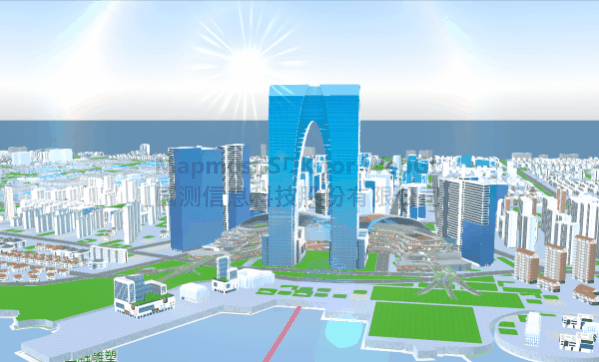
<!DOCTYPE html>
<html lang="en">
<head>
  <meta charset="UTF-8">
  <title>Halo</title>
  <style>
    body {
      margin: 0;
      padding: 0;
    }

    #map {
      position: absolute;
      top: 0;
      bottom: 0;
      width: 100%;
    }
  </style>
  <script src="https://delivery.mapmost.com/cdn/sdk/webgl/v9.16.0/mapmost-webgl-min.js"></script>
  <script src='./dat.gui.js'></script>
</head>
<body>
  <div id='map'></div>
  <script>
    var map = new mapmost.Map({
      style: "<your style url>",
      container: 'map',
      center: [120.67617982483154, 31.317070971395978],
      zoom: 16.011081413474614,
      bearing: -128.8049986576308,
      pitch: 82,
      sky: "light",
      userId: '***', // Authorization code
    });

    map.on("load", function () {

      let models_obj = [
        "<your model url>"
      ].map(item => ({
        type: 'glb',
        url: item,
      }));
      let options_obj = {
        id: 'model_id',
        type: 'model',
        models: models_obj,
        center: [120.7461498, 31.3307914, 0.2],
        project: "3857",
        callback: function (group, layer) {

          // halo
          let pvGY = mapmost.PostProcessStageLibrary.initHaloSun(map);
          //Add to scene
          map.addPostProcess(pvGY);
          // intensity
          pvGY.sunBrightness = 1;
          // sun position
          pvGY.sunDir = [1, 0.5, 0.0];
          // halo color
          pvGY.sunColor = [0.5, 0.6, 0.7];
          // Turn on the closed state
          pvGY.enabled = true;
        }
      };
      map.addLayer(options_obj);
    });
  </script>
</body>
</html>