3D graphics drawing and editing
Supports drawing and editing graphics in 3D scenes, including rectangles, circles, polygons, etc.
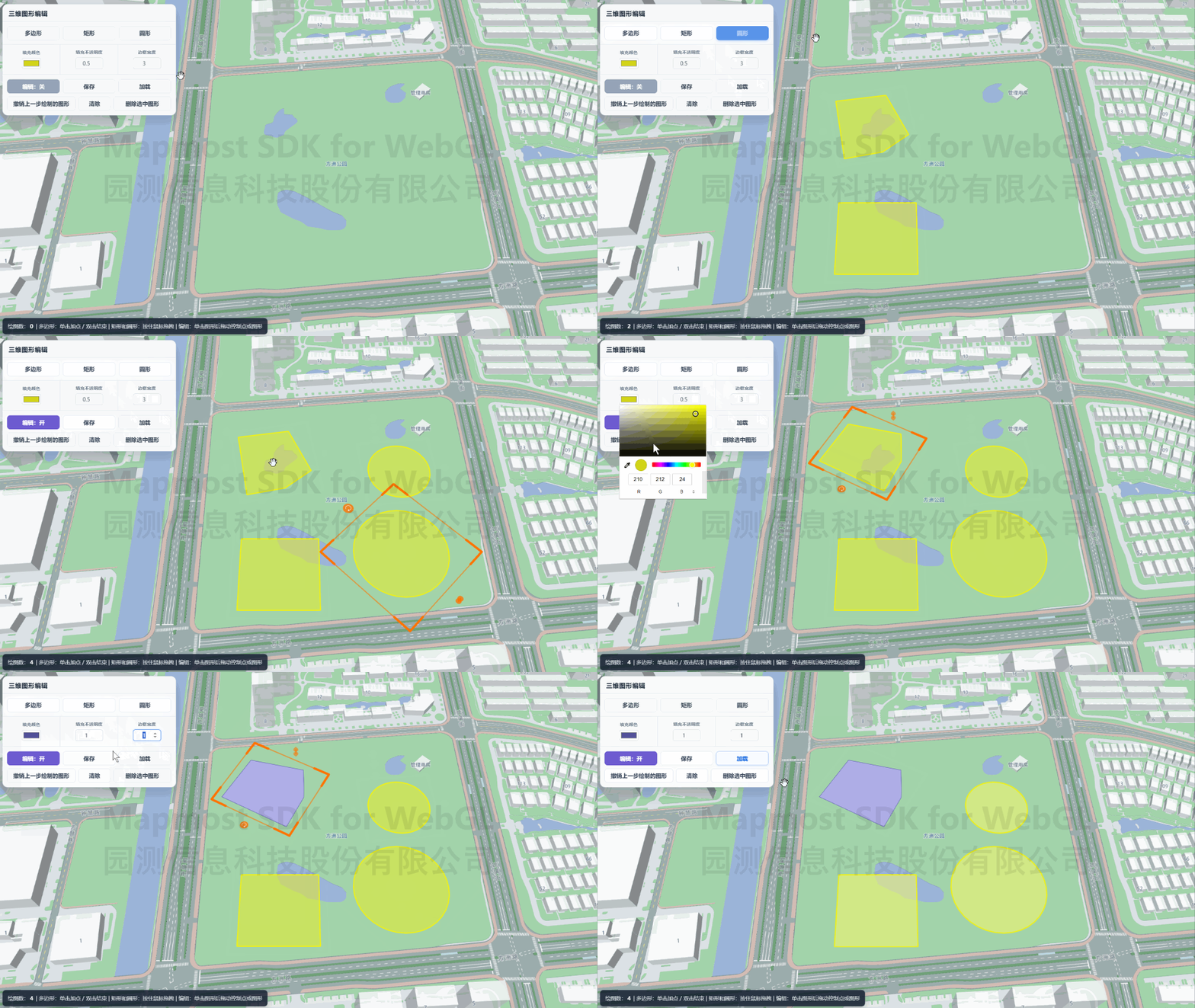
<!DOCTYPE html>
<html>
<head>
    <meta charset="utf-8"/>
    <title>Three-dimensional graphics drawing and editing</title>
    <meta name="viewport" content="initial-scale=1,maximum-scale=1,user-scalable=no"/>
    <link rel="stylesheet" href="./GraphicEdit.css">
    <script src="https://delivery.mapmost.com/cdn/sdk/webgl/v9.16.0/mapmost-webgl-min.js"></script>
</head>
<body>
    <div id="map"></div>
    <div id="controlPanel">
        <div class="panel-title">3D graphics editing</div>

        <div id="toolbar" class="panel-row">
            <button id="btnPolygon" title="Click to place the vertex, double-click or Enter to close" onclick="toggleDrawMode('polygon', this)">Polygon</button>
            <button id="btnRectangle" title="Hold down the mouse and drag to complete" onclick="toggleDrawMode('rectangle', this)">Rectangle</button>
            <button id="btnCircle" title="Hold down the mouse and drag to complete" onclick="toggleDrawMode('circle', this)">Circle</button>
        </div>

        <div id="stylePanel" class="panel-row">
            <div class="styleItem">
                <label for="fillColorPicker">Fill Color</label>
                <input id="fillColorPicker" type="color" value="#D2D418" title="Fill Color" oninput="changeFillColor(this.value)">
            </div>
            <div class="styleItem">
                <label for="fillOpacityInput">Fill Opacity</label>
                <input id="fillOpacityInput" type="number" value="0.5" min="0" max="1" step="0.1" title="Fill Opacity" oninput="changeFillOpacity(this.value)">
            </div>
            <div class="styleItem">
                <label for="strokeWidthInput">Border width</label>
                <input id="strokeWidthInput" type="number" value="3" min="1" max="20" title="Border width (px)" oninput="changeStrokeWidth(this.value)">
            </div>
        </div>

        <div id="operationPanel">
            <div class="operation-row">
                <button id="btnToggleEdit" class="edit-button" onclick="toggleEditMode()">Edit: On</button>
                <button id="btnSave" onclick="saveShapes()">Save</button>
                <button id="btnLoad" onclick="loadShapes()">Load</button>
            </div>
            <div class="operation-row">
                <button id="btnUndo" title="Undo the last operation" onclick="undoLastOperation()">Undo the graphic drawn in the previous step</button>
                <button id="btnClear" onclick="clearAllShapes()">Clear</button>
                <button id="btnDelete" onclick="deleteSelectedShape()">Delete selected shape</button>
            </div>
        </div>
    </div>

    <script>
        const editButton = document.getElementById('btnToggleEdit');

        let sketchLayer;
        let sketchShapes;
        let modelLayer;

        const map = new mapmost.Map({
            container: 'map',
            style: "<your style url>",
            center: [120.73783051606478, 31.31409917592829],
            doubleClickZoom: false,
            zoom: 16,
            pitch: 45,
            bearing: -20,
            sky: 'light',
            userId: '***', // Authorization code
        });

        map.on('load', iaddSketchLayer);

        //Add a three-dimensional graphics drawing layer
        function addSketchLayer() {
            map.addLayer({
                id: 'graphic-sketch',
                type: 'sketch',
                fillColor: '#D2D418', // fill color
                fillOpacity: 0.5, // fill opacity
                strokeColor: '#D2D418', // border color
                strokeWidth: 3, // border width
                strokeOpacity: 1, // border opacity
                editStrokeColor: '#ff6600', // Edit border color
                onDrawEnd: handleDrawEnd,
                callback: handleSketchLayerReady
            });
        }

        // Graphic drawing layer callback function
        function handleSketchLayerReady(shapes, layer) {
            sketchShapes = shapes;
            sketchLayer = layer;
        }

        // Callback function executed after drawing or editing
        function handleDrawEnd(shape) {
            console.log('Drawing or editing completed:', shape);
        }

        //Switch drawing mode
        function toggleDrawMode(mode, button) {
            if (!sketchLayer) return;

            sketchLayer.setMode(mode);
        }

        // Undo the graphics drawn in the previous step
        function undoLastOperation() {
            if (!sketchLayer || !sketchLayer.undo()) return;
        }

        // Clear all drawn graphics
        function clearAllShapes() {
            if (!sketchLayer) return;

            sketchLayer.clear();
        }

        //Delete the selected graphic
        function deleteSelectedShape() {
            if (!sketchLayer || !sketchLayer.removeSelected()) {
                alert('Please enable editing first and select a graphic.');
                return;
            }
        }

        // Turn on/off editing mode
        function toggleEditMode() {
            if (!sketchLayer) return;

            const nextEditable = !sketchLayer.editable;
            sketchLayer.setEditable(nextEditable);
            editButton.textContent = `Edit: ${nextEditable ? 'On' : 'Off'}`;
            editButton.classList.toggle('is-off', !nextEditable);
        }

        //Update the fill color and border color of the selected graphic
        function changeFillColor(color) {
            if (!sketchLayer) return;

            const shape = getSelectedShape();
            if (shape) {
                //Update the fill surface color of the selected shape
                sketchLayer.updateShapeFillColor(shape, color);
                //Update the border line color of the selected graphic
                sketchLayer.updateShapeStrokeColor(shape, color);
            } else {
                sketchLayer.fillColor = color;
                sketchLayer.strokeColor = color;
            }
        }

        //Update the fill opacity of the selected shape
        function changeFillOpacity(value) {
            if (!sketchLayer) return;

            const opacity = Number(value);
            if (Number.isNaN(opacity)) return;

            const shape = getSelectedShape();
            if (shape) {
                //Update the transparency of the filled surface of the selected shape
                sketchLayer.updateShapeFillOpacity(shape, opacity);
            } else {
                sketchLayer.fillOpacity = opacity;
            }
        }

        //Update the border width of the selected graphic
        function changeStrokeWidth(value) {
            if (!sketchLayer) return;

            const width = Number(value) || 1;
            const shape = getSelectedShape();
            if (shape) {
                //Update the border line width of the selected graphic
                sketchLayer.updateShapeStrokeWidth(shape, width);
            } else {
                sketchLayer.strokeWidth = width;
            }
        }

        // Get the currently selected graphic
        function getSelectedShape() {
            if (typeof sketchLayer.getSelectedShape === 'function') {
                return sketchLayer.getSelectedShape();
            }
            return sketchLayer.selectedShape;
        }

        //Save the currently drawn graphics
        function saveShapes() {
            if (!sketchLayer) return;

            //Export the currently drawn graphics data
            const data = sketchLayer.exportData();
            localStorage.setItem('sketch_shapes', JSON.stringify(data));
            alert(`Save successfully, total ${data.length} graphics.`);
        }

        //Load saved graphics
        function loadShapes() {
            if (!sketchLayer) return;

            const savedShapes = localStorage.getItem('sketch_shapes');
            if (!savedShapes) {
                alert('No saved graphic data.');
                return;
            }

            //Import saved graphics data
            sketchLayer.importData(JSON.parse(savedShapes));
        }
    </script>

</body>
</html>